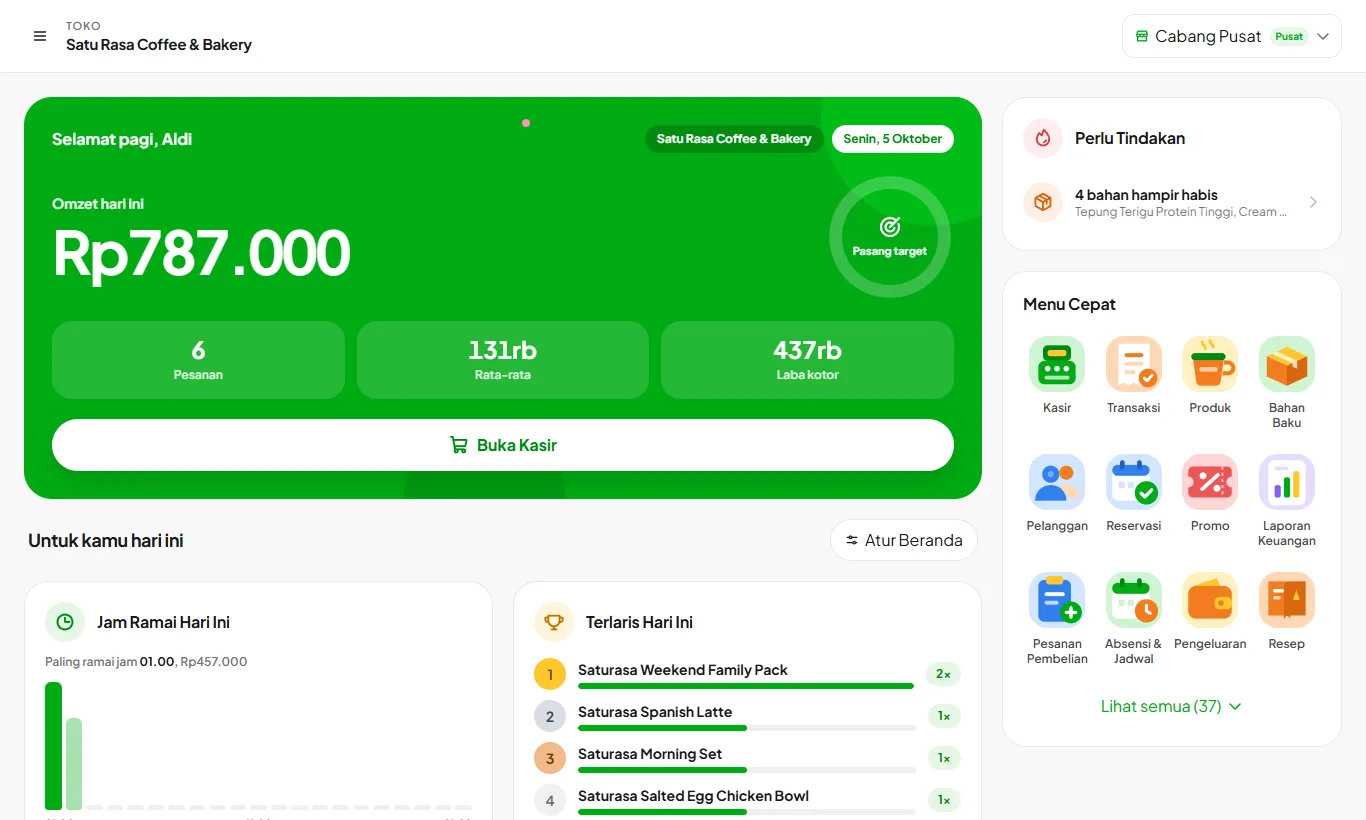
An App for Catering
For businesses with bulk orders, partial payment up front, and costs that go out long before the money comes in.
Price per head is guessed from experience
Recipes hold ingredients and portions, so the cost per head comes from a number. Multiply it by the order size.
Orders are paid later and the record lives in WhatsApp
Open bills hold orders that are not settled yet, and customer records keep their order history alongside their contact details.
Ingredients come first, the supplier is paid later
Supplier payables are grouped per supplier with the age of each debt, so you can see which has been waiting longest.
Profit per event is never clear
The profit and loss report builds from sales, ingredient cost, and other expenses down to net profit, not just money received.
The Features That Matter for Catering
Recipes and automatic costing
Each item's cost and margin, from the latest ingredient prices. Per-serving recipes from ingredients. Cost and margin for every item.
Growth and upCustomers, points, and membership
You set the points rules and membership tiers. Customer records and purchase history. Upcoming birthdays.
Growth and upSupplier debt
Unpaid bills never slip through. Debt per supplier. Debt age.
Growth and upPurchase orders
Purchases tracked from ordering to receiving. Partial receiving. Stock increases automatically on receipt.
EnterpriseExpenses and financial reports
Your real profit and loss, not just sales. Expense tracking. Profit and loss, cash flow, and break-even.
All plansImport and export data
Your data, take it anywhere. Import from Excel. Export to Excel and PDF.
Choose a Plan That Fits Your Business Scale
Flexible and adaptable to your budget and business needs.
Starter
For new F&B businesses
or Rp960.000/year
save 17%30 days free · no credit card needed
What's included
- Cashier, tables, shifts, and offline mode
- Recipes, automatic costing, and ingredient stock
- Promos, receipts, and packaging labels
- Receipts to the customer's WhatsApp
- Kelola Capital for business funding (coming soon)
- 3 staff, 75 products, 1 branch
Best for: Stalls, coffee shops, booths, carts, home kitchens
Growth
For established businesses
or Rp1.960.000/year
save 17%30 days free · no credit card needed
What's included
- Everything in Starter, plus:
- QR Menu, reservations, and customer display
- Customers, points, tabs, deposits, WhatsApp campaigns
- WhatsApp Assistant and a free e-SIM for the bot number
- Purchase orders, attendance, and payroll
- 10 staff, 150 products, 1 branch
Best for: Cafes, coffee shops, restaurants, bakeries
Enterprise
For rapidly growing businesses
or Rp3.960.000/year
save 17%30 days free · no credit card needed
What's included
- Everything in Growth, plus:
- Kitchen display (KDS) and menu engineering
- Financial reports, accounting, and balance sheet
- Reorder center and activity log
- Unlimited staff and products, up to 5 branches
Best for: Multi-outlet, franchise, F&B brands
Frequently Asked Questions
Can't find the answer you're looking for? Our team is ready to help directly via WhatsApp.
Ask via WhatsAppSee all questionsWhat is Kelola?
Kelola is a multi-branch POS app that calculates your profit and loss automatically, down to the ingredient level. Every product has a recipe, so each transaction deducts ingredient stock, records the real cost, and feeds your financial reports.
Is HPP the same as COGS?
Yes. HPP (harga pokok penjualan) is the Indonesian term for cost of goods sold. Kelola calculates it per serving from the recipe: pack price divided by pack size, multiplied by the amount used, plus per-serving extras such as cups and straws. Whenever an ingredient purchase price changes, the figure changes with it, and so does each menu item's margin.
If the internet connection drops, can I still sell at the register?
Yes, and it does more than just queue transactions. While offline, Kelola still checks ingredient availability and holds the stock already used, so items that are actually sold out don't get sold again. Once you're back online, the queue syncs in transaction order.
Can my cashier see my business profit?
No. There are four access roles: Superadmin, Owner, Manager, and Cashier. Expenses and financial reports can only be opened by the owner. Managers and cashiers never see those menus at all, they aren't merely blocked on click.
How does QRIS payment work?
You upload your own static merchant QRIS, and at payment time Kelola displays a QR with the amount already filled in for the total. The customer just scans and pays. The money still goes straight to your account with no extra cut from us, and the cashier confirms once the payment lands in your bank or e-wallet app.
Do I need to install an app first?
No. Kelola is a PWA (Progressive Web App): open it in the browser, then install it to the home screen of a phone, tablet, or computer like a regular app, without going through an app store. It is the same version on Android, iOS, Windows, and macOS, and every update takes effect without a re-download.
Do I need to buy special hardware?
It's not required. Kelola works on the tablet or phone you already own and supports standard ESC/POS thermal printers over Bluetooth or USB. If you'd rather have ready-to-use devices, we also offer affordable tablet and printer bundles.
Can Kelola connect automatically to GoFood, GrabFood, or ShopeeFood?
Not yet. Aggregator orders do not reach the cashier on their own, so they are still entered manually. What is available is Order Channels: a separate menu and prices per platform with their commission, and the cashier just picks the order source on the first item. Ingredient stock is still deducted by recipe.
Can I move data over from my old system?
Customer and ingredient data can be imported from Excel using the templates we provide. Products and recipes are entered in the app, and our team is happy to help you get started.
If my free trial ends, do I lose my data?
No. The account moves to an expired state and is directed to the renewal page, with your data intact. You can also export everything to Excel and PDF at any time.
How long does setup take before I can start selling?
On average, under 15 minutes, from creating an account, entering products & ingredients, to your first transaction at the register.
See your real profit starting today
Try every feature free for 30 days. No credit card, ready to sell in 15 minutes.