From daily transactions to profit control, Kelola brings your entire F&B business operations together without switching between systems.
48features
9categories
24features on every plan
Show features for48 features available
01
Cashier and sales
From the first order to cash in the drawer.
15 features
All plans
A fast cashier for rush hour
Fewer taps per order, so queues move fast.
The cashier screen is built for busy hours. Pick items from a photo catalog, a compact catalog without photos, or a list. Star the items ordered most so they always sit in the Favorites row. The cart stays compact: swipe left to remove an item with an Undo option, tap an item to add a note such as no sugar. As soon as a payment method is chosen, its payment screen opens.
Three catalog views: large grid, compact grid, and list
A Favorites row per cashier account, filled from best sellers until you set it
Per-item notes with quick picks
Computer shortcuts: F2 to search, F9 to pay
Manual discounts at the register, with a percentage cap for cashiers
Every way customers pay, including a mix of methods.
Cash payments work out the change and show it large so the cashier never hands back the wrong amount. QRIS uses your store's own static QRIS, but the code shown already carries the order amount, so customers don't type numbers and the money goes straight to your account. When a customer wants to pay part in cash and part by QRIS, use Split Method.
Cash with automatic change
QRIS with the amount filled in automatically
Debit or credit card
Split Method: combine several methods in one order
Tax, service charge, packaging, and delivery fees calculated on every sale.
Switch on the ones you use in Store Settings. Tax, PBJT, and service charge are a percentage of the total after discounts, while the delivery fee is a fixed amount per sale. The packaging fee can be per order or per item, and with Dine In or Take Away turned on, the cashier must pick the type of every order so packaging is charged only for Take Away and online orders. Each fee shows separately on the receipt and is recorded in reports.
Tax and PBJT as a percentage
Service charge as a percentage
Packaging fee per order or per item
Dine In or Take Away required per order, can be turned off
Delivery fee per sale
Calculated on the total after discounts
Shown separately on receipts and reports
All plans
Tables and open bills
Order now, pay later, made for dine-in.
Save an order to a table, then add to it any time while guests are still seated. A provisional bill can be printed before payment, checkers print straight to the kitchen, and tables can be moved when guests change seats. When they leave, settle with any method, including Split Method. QR Menu orders land in the same list.
Save to a table and keep adding orders
Print provisional bills and kitchen checkers
Move tables
Cancel a table with a reason, ingredients are restored
Cashiers open a shift with the starting cash in the drawer. Money that moves outside of sales, such as buying ice or handing cash to the owner, is recorded as Cash Out or Cash In with a reason. At closing, the cashier counts the physical cash, and Kelola compares it with the records and shows the difference, with a sales summary per payment method.
Opening cash when the shift starts
Cash In and Cash Out with a reason
Physical count and cash difference at closing
Alerts to the owner when a shift closes or the difference is large
Create percentage discounts, fixed amounts, buy X get Y, or promos with a minimum spend. Choose which products get the discount, the dates, days, and hours it runs, coupon codes, and usage limits. Cashiers can also give a per-order discount within the limit you set, and anything above it asks for an owner or manager PIN.
Percentage, fixed amount, buy X get Y, and minimum spend
Delivery apps usually need higher prices to cover their commission. Create order channels such as GoFood, GrabFood, or any other platform, set each item's price per channel, and record its commission percentage. When recording a delivery order, the cashier just picks the channel and the right price applies automatically.
As many order channels as you need
Per-item prices per channel
A commission percentage per channel, deducted automatically in the profit and loss report
Sales booked as receivables, since the money arrives later
Not connected directly to the apps yet: the cashier enters the orders
All plans
Receipts, checkers, and packaging labels
Print straight from the browser, no extra app.
Connect a Bluetooth, USB, or LAN thermal printer straight from the browser. Pick a receipt style, switch on the parts you want such as your logo, WiFi, and social media, then check the preview. Kitchen checkers print automatically, on a separate printer if you like. Per-cup packaging labels print automatically right on their stickers. Receipts can also be sent to the customer's WhatsApp as an image identical to the printed receipt.
Bluetooth and USB thermal printers
Receipt, bill, and checker styles with preview
A separate kitchen printer for checkers
Packaging labels: four styles, any sticker size such as 40 x 30 mm, printed automatically
A reconnect dialog when the receipt, kitchen, or label printer drops
Set up in Printer & Print, which cashiers can open
WhatsApp receipts as an image, same as the printed one
Find transactions in the history, open their details, and reprint the receipt when needed. Refunds can be partial, covering only the returned items. Mistaken transactions are voided with a reason and an owner or manager PIN, and their stock and sales are reversed so your reports stay correct.
Search and reprint receipts
Reprint receipts, checkers, and labels straight from History at the cashier
Partial refunds
Voids with a reason and PIN, stock and sales reversed
Sensitive actions need a manager's OK, without sharing passwords.
Owners and managers each have a 6-digit PIN. When a cashier voids a transaction, issues a refund, or gives a discount above the limit, the screen asks for that PIN. Cashiers never learn their manager's password, and every approval is recorded under the approver's name.
Sales are saved on the device and sent later on their own.
When the connection drops, the cashier can keep recording sales, including checking ingredient availability. Transactions are stored on the device and sent automatically once the internet is back, even after the app is closed. The number of unsent transactions is always visible, so nothing disappears silently.
Sales keep recording without internet
Sent automatically when the connection returns
Unsent transactions are always visible
Growth and up
Table reservations, by phone or online
Guests book through a link, you just confirm.
Record reservations from phone calls or WhatsApp, or turn on online reservations and share the link. Guests pick the date, time, and party size within the schedule and capacity you set, and can even pre-order food and pay a deposit. You confirm or decline, send a reminder, then open their table as a bill when they arrive; the deposit comes straight off the bill.
An online booking link with schedule and capacity
Pre-order food with the booking
Deposit or full payment, at the amount you set
Confirm, decline, and send reminders
Guests reply YA or BATAL on WhatsApp and the booking updates itself
Reservations become table bills when guests arrive
See free and taken tables at a glance, pick tables from the plan.
Lay out your space: areas, tables with their seats and shape, and markers like the door and cashier. At the cashier, Save to Table and Move Table open the plan full screen, showing each table's total and time seated plus tables reserved for later.
Cake or catering picked up later, deposit taken now.
Save orders for later pickup right from the cashier, with the customer name, pickup time, and notes. Take the deposit on the spot, track every order in one tab, then charge the balance when the customer arrives. You set the minimum deposit.
Pickup time and order notes
Deposits by cash, QRIS, transfer, or card
The balance is worked out at pickup
Deposit receipt and a day-before reminder on the customer's WhatsApp
Guests scan, choose, and order without installing anything.
Download a QR poster for your tables. Guests scan it with their phone camera, browse the menu with photos, and order by themselves. Orders land at the cashier right away with a sound and a notification, ready to process without re-entering.
A print-ready QR poster
A menu with photos and categories
Orders reach the cashier with a sound and a notification
Add products with photos, categories, and prices. Variants such as Regular and Large sizes have their own price and recipe. Ready-made goods such as bottled water or crackers sell with their own stock and no recipe. Menus already in Excel can be imported in one go.
Add-on groups such as Sugar Level, Extra Shot, or Toppings are created once and attached to many products. Each option can carry an extra price and deduct its own ingredients, so the cost per cup stays accurate.
Each item's cost and margin, from the latest ingredient prices.
Build per-serving recipes from your ingredients. Kelola works out every item's cost from the latest ingredient prices and shows its margin, so you know which items truly make money. When ingredient prices rise, the cost per serving follows. Costs and margins are only visible to owners and managers.
Record ingredients with their units, such as grams, milliliters, or pieces. Every sale deducts stock according to the recipe, so there's no manual counting. Set a minimum stock and Kelola alerts you as soon as an ingredient hits it, before it runs out mid-rush.
House-made syrup, stock, and dough get their own stock and COGS.
Record the syrup, stock, or dough you make in-house with its production recipe. Press Produce, and the raw ingredients are deducted while the prepped ingredient's stock goes up. Its unit COGS comes from the latest raw ingredient prices, so when sugar gets pricier, the COGS of every menu item using that syrup follows.
Count your ingredients physically and enter the numbers. The difference from the records is saved as an adjustment with its rupiah value, never quietly erased. Every stock change, from sales, purchases, production, and waste to counts, is recorded in Stock Movements.
Kelola gathers ingredients near or below minimum stock, suggests quantities and priorities, and turns them into purchase orders to suppliers in a few taps.
Create purchase orders to suppliers, then receive the goods, even partially when not everything arrives. Every receipt adds stock and records the price paid, so menu costs adjust.
Partial receiving
Stock increases automatically on receipt
Purchase price recorded per receipt
Sent to the supplier's WhatsApp; an OK reply marks it Confirmed
Save customers right from the cashier, just a name when it's busy. Record birthdays for greetings and birthday promos. Turn on loyalty points, set tiers such as Silver and Gold, and let customers redeem points as discounts at the cashier.
Customer records and purchase history
Upcoming birthdays
Points and membership tiers
Points, tier upgrades, and deposit balance on the WhatsApp receipt
Customers pay ahead, purchases come off their balance.
Customers top up a balance, and each purchase is deducted from it. Top-ups are recorded as deposits held, not sales, so reports never count the same money twice.
Top up and pay with the balance
Recorded as held funds, not sales
Growth and up
Customer tabs
Buy now, pay later, all on record.
Regular customers can pay with a tab up to the limit you set. Every tab and payment is recorded, outstanding balances show on the Customers page, reminders can be sent by WhatsApp, and cash payments count toward the shift close.
Connect your store's WhatsApp, pick a customer segment, and write a message with their name, points, and tier filled in. Campaigns can go out now, on a schedule, or repeat automatically.
Customer segments
Name, points, and tier placeholders
Ready-made and custom message templates
Scheduled and recurring sends
Customers can pause promos for 7 days by replying ISTIRAHAT
The store bot number replies to customers and forwards complaints.
Customers just send KOMPLAIN followed by their complaint to the store bot number. The bot replies politely and forwards it to the WhatsApp of the owner and managers, or cashiers when there is no manager. Reservation guests reply YA or BATAL, customers can pause promos for 7 days with ISTIRAHAT, and messages the bot can't answer get a polite reply while the team is notified.
Complaints forwarded to owners and managers
YA or BATAL replies for reservations
ISTIRAHAT and MULAI to pause promos
MENU, JAM, LOKASI, and RESERVASI answered from store data
Invite staff by WhatsApp or email and choose their role: Manager or Cashier. Cashiers focus on selling without seeing costs and profit, managers help run operations, and owners control everything. Every account has a verified WhatsApp number for security codes and customer complaints. Staff who leave are simply deactivated. Staff count follows your plan's limit.
Clock in with a photo and location, schedules planned weekly.
Turn it on when you need it, plan the weekly schedule, and staff clock in and out with a selfie and location. A Clock In screen greets staff when they open the app, a clock-out reminder appears when the shift ends, and you're alerted when someone hasn't clocked in.
Set up each staff member's pay profile, then create a monthly payroll draft calculated from attendance: hours worked, overtime, and lateness deductions. Adjust if needed, then lock and pay.
Changes to prices, recipes, stock, and key settings are recorded with who made them and when, so every change can be traced.
A full change trail
07
Reports and finance
Numbers you can act on right away.
7 features
All plans
Home and daily target
Today's sales and what needs action, at a glance.
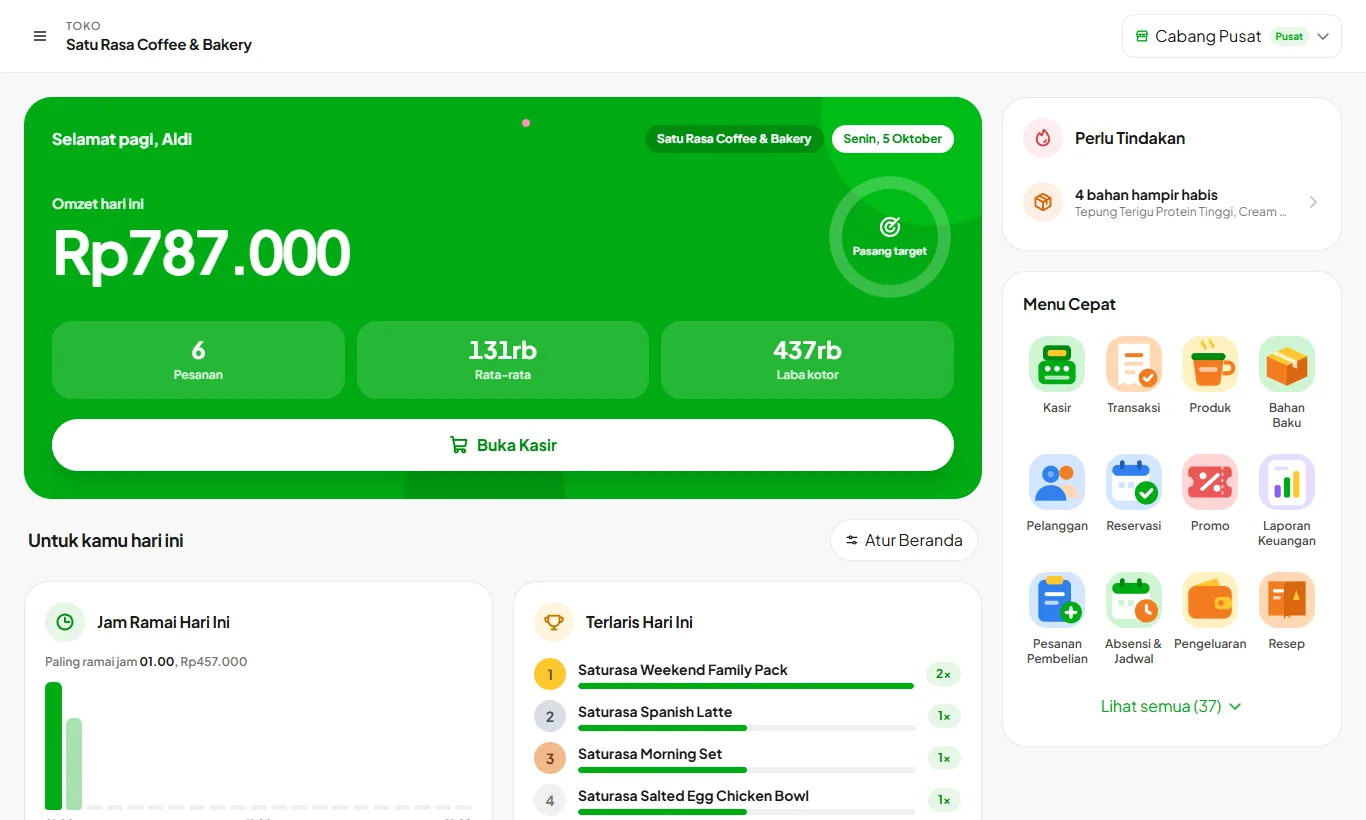
Home opens with today's sales, a comparison with yesterday at the same hour, and a daily target ring that fills as you sell. Below are cards you arrange yourself: Needs Attention, Busy Hours, Best Sellers, Payment Methods, Inventory, Shift and Cash Drawer, and Business Health with a score and suggestions you can act on.
Record operating expenses such as rent, electricity, and wages. Kelola builds a layered profit and loss, cash flow, break-even point, cash reconciliation, and promo effectiveness. These reports are for owners only.
Full bookkeeping that builds itself from your sales.
Every sale, expense, ingredient purchase, deposit, tab, and down payment becomes a debit and credit journal automatically, including past data. From there Kelola builds the general ledger, trial balance, balance sheet, and profit and loss. Enter opening balances and fixed assets once, and depreciation runs on its own. Events outside the cashier, like owner capital or a GoFood payout, are recorded with ready-made choices, and a daily PBJT recap is ready for local tax filing.
Every item is mapped into four groups by how well it sells and how profitable it is, so you can see the stars to protect, the popular but thin-margin items, and the ones to replace.
Business capital from OJK-licensed financing partners.
Kelola turns your cashier data into a monthly business summary and rates how ready your store is for financing. Prepare your owner, business, finance, and document details once, starting now; when the program opens, just send your application. Everything is put together in one package ready for a bank. Financing is provided by OJK-licensed partners.
Readiness score from cashier data
Owner, business, and finance details plus document upload
Invite other stores and earn 10% of every payment they make.
Store owners turn on their own referral code in the Referral menu and share it on WhatsApp in one tap. Every store that signs up through the link or code is recorded under their name, and 10% of each of those stores' payments is transferred to the owner's account for as long as they subscribe. Invited stores skip the trial but pay upfront with a 1-month bonus.
Import products, ingredients, and customers from Excel so you don't retype anything. Sales, stock, and reports download as Excel or PDF to work with further or hand to your accountant.
Import from Excel
Export to Excel and PDF
08
Screens and devices
One system across phone, tablet, computer, and extra screens.
5 features
All plans
Bell and phone notifications
Orders, reservations, and low stock reach you instantly.
Notifications reach your phone even when the app is closed, and their history stays in the bell in the top right corner. Choose which types you want: QR Menu orders, reservations, critical stock, shift closings, cash differences, shift reminders and swaps, and Kelola News about app updates.
Phone notifications per type, on or off
History, mark as read, and clear in the bell; clearing applies to every device on the account
A daily report to the owner's email and WhatsApp, with the PDF
Weekly and monthly summaries with the PDF on the owner's WhatsApp
WhatsApp alerts to the owner: cash differences, voided transactions, ingredients out of stock
Customers see their own order, and promos when it's quiet.
Set up a tablet or monitor facing customers and pair it with a code at kelola.pro/d, no login. While the cashier serves, it shows a receipt-style order and a large total, then the QRIS code when the customer pays by QRIS. When it's quiet, it plays promo images and videos. Each screen can be a cashier screen or a promo screen, with its own choice of content.
Pair with a code, no login
Order details and total
Promo images and videos when idle; videos compressed automatically
QRIS shown large on the customer screen
Cashier or promo screen, content chosen per screen
The buyer's phone rings when the order is ready, no pager hardware needed.
When an order is ready, the cashier presses Call or the kitchen presses Done. The QR Menu order page on the buyer's phone rings and vibrates right away, cashier buyers who scanned the small receipt QR get a pager on their phone, and buyers with a saved number are notified on WhatsApp. Table orders are not called since they are served at the table.
The QR Menu order page rings and vibrates when ready
A pager on the buyer's phone through a small receipt QR
Automatic WhatsApp for QR Menu buyers and CRM customers
Orders from the cashier, tables, and QR Menu arrive on the kitchen screen by themselves with a chime. Cooks tick off finished items, press Done for an order, and can undo it if they slip. The queue can be filtered by Table, QR Menu, or Cashier.
Kelola runs in the browser on phones, tablets, and computers, and can be installed on the home screen like a regular app. Data syncs instantly between devices, so owners can check in from home while cashiers sell in the store. Light and dark modes are available.
Install to the home screen without an app store
Instant sync between devices
Light and dark mode
09
Multiple branches
Run every branch from one account.
1 feature
Enterprise
Multiple branches and stock transfers
Up to 5 branches in one account.
Add up to 5 branches. Prices, menus, and opening hours can differ per branch, and each branch has its own stock. Move ingredients between branches with stock transfers confirmed by the receiving branch, then view one branch or all branches at once.
F&B businesses rarely lose money because it's quiet. They lose it through leaks: inconsistent portions, expired ingredients, supplier prices creeping up unnoticed, promos that quietly eat the margin.
Your Real Profit
Every menu item's cost comes from its recipe and ingredients. You know exactly how much profit actually reaches your pocket, not just revenue.
Automatic Ingredient Stock
The moment a menu item sells, ingredient stock drops according to the recipe. What gets deducted is the ingredients, not a finished-goods count.
COGS Always Current
Milk got more expensive this week? The margin on every menu item using milk is corrected in your reports right away.
Profit per Menu Item
Know which items are most profitable and which ones just sell well on a thin margin. Menu decisions get sharper.
Waste You Can Track
Wasted ingredients are recorded and counted. If the value goes above a reasonable share of revenue, the system warns you on its own.
Purchase Price History
A supplier raises the price by Rp 2,000 per kilo without telling anyone? In Kelola that increase is on the record, with the date attached.
Kelola isn't just a cashier app. It's a profit control system for your F&B business.
Transparency
Limits You Should Know About
Better to know before you subscribe than to discover it once you are running.
No direct integration with delivery aggregators yet
Kelola is not connected to the GoFood, GrabFood, or ShopeeFood systems. Orders from those apps do not arrive on the cashier screen by themselves.
In practice, when an order comes in on the partner tablet, the cashier still enters it into Kelola as a normal order. Direct integration requires official partner access from each platform, and we do not hold that access today.
Already available: Order Channels
Aggregator sales are still recorded in full and kept separate, so your reports lose nothing even though entry is manual.
Separate menus and prices per platform, set on one page, without changing your in-store prices.
Each platform commission is recorded, and what you receive per item is shown right away.
The cashier just picks GoFood or another platform on the first item, and prices follow.
Platform sales are kept apart from the cash drawer, since the money arrives later.
Ingredient stock is still deducted by recipe, just like in-store sales.
So sales per channel can be compared: what you actually take home from GoFood versus direct sales.
See your real profit starting today
Try every feature free for 30 days. No credit card, ready to sell in 15 minutes.