
Kitchen Display (KDS)
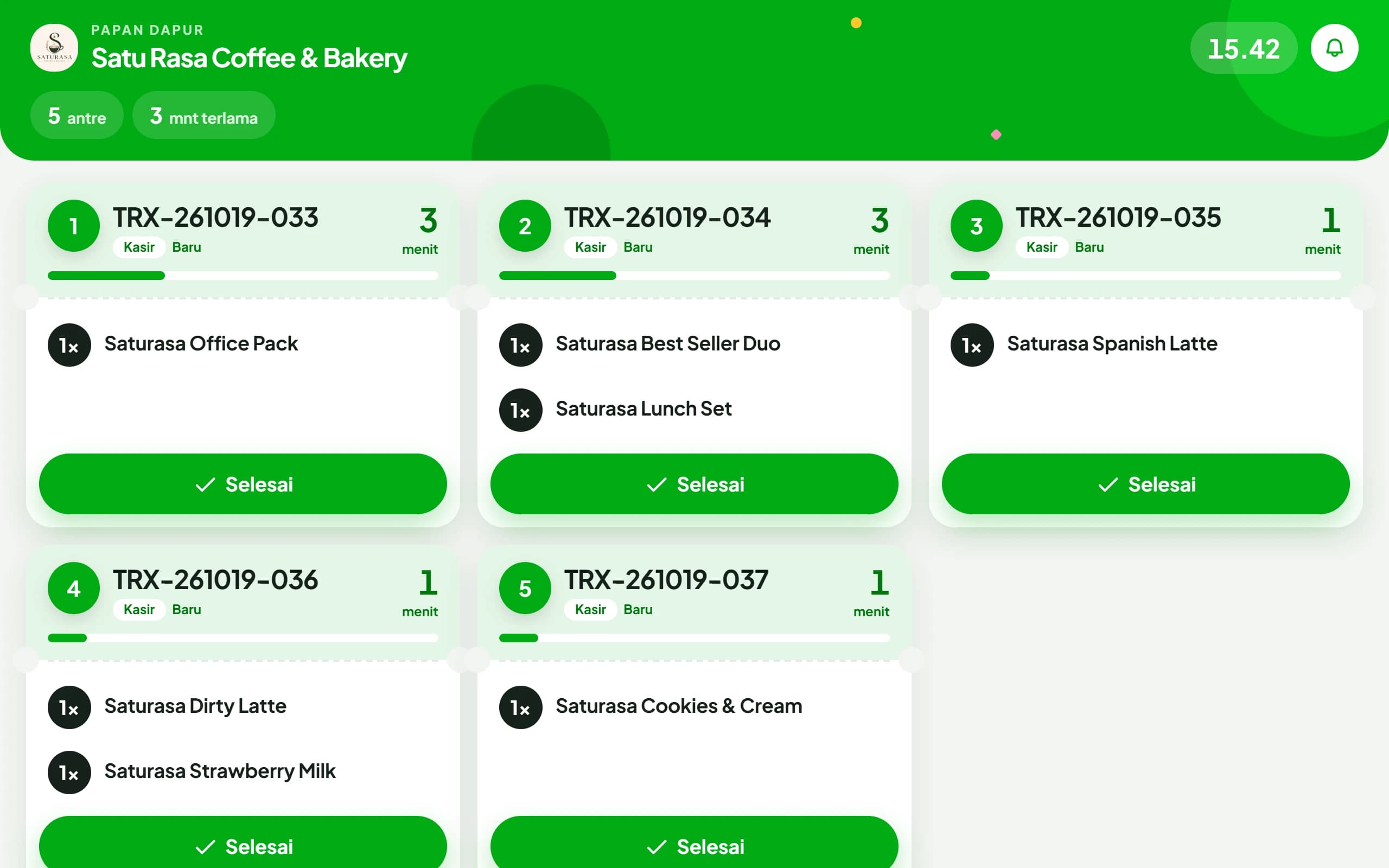
Replaces printed checkers as the production queue. Full screen on the kitchen device, no login, and Done is tapped right there.
What you need
- An active Enterprise plan
- One tablet or TV with a browser, facing the kitchen work area
- An internet connection on that device
Setting up
Create a kitchen screen code
In Settings, Customer & Kitchen Screens, pick Kitchen Screen, name it, for example Main Kitchen, then tap Create Code.
Open the address on the kitchen device
In the kitchen tablet or TV browser, open app.kelola.pro/d. No login needed.
Type the code
Enter the 6 letters shown in Settings. The board opens full screen, and Kitchen Display under Customer & Kitchen Screens turns on too.
Pair it before opening hours. Only orders created after the board is active join the queue. Bills already open at that moment will not appear.
Where orders come from
Three paths meet on the same board. Nothing has to be sent by hand.
- Table bills
- Arrive the moment the bill is opened at the counter
- QR Menu
- Arrive once the order is paid, not when the customer places it
- Counter sales
- Arrive the moment the sale is completed
Reading the board
Card number 1 has waited the longest. The card header color follows the queue age.
- Green, New
- Under 5 minutes
- Yellow, Waiting
- 5 to 10 minutes
- Red, Late
- Over 10 minutes, the card pulses
Common questions
Tapped Done by mistake?
Tap Undo on the bottom bar within 5 seconds. The card returns to the queue.
Can I tick items one by one?
Yes. Tap an item to mark it made. These ticks only help the kitchen screen and do not change the order.
Is there a sound for new orders?
Yes, a short chime. Turn it on or off with the bell button at the top right of the board.
The tablet is mounted upright but the view is sideways?
Set that device's display direction in Settings, Customer & Kitchen Screens. The screen rotates without re-pairing.
Does tapping Done mean the bill is paid?
No. Done only marks the kitchen's part as finished. A table bill stays open until it is paid at the counter, and the kitchen cannot remove a charge.
A customer adds to an order at the same table, what happens?
That bill reappears on the board as soon as the new items land, so the addition is not missed.
What if a bill is split between guests?
The split inherits its parent's status. Drinks already made do not come back as a new order.
With several outlets, do the boards mix?
No. The board only shows orders for the outlet selected on that device.
Does the customer know when a QR Menu order is marked done?
Yes. The page on their phone changes to order ready by itself.
Do we still need printed checker slips?
Not necessarily. KDS takes over the queue. If you still want something physical to stick on the cup, use Packaging Labels.